Choose a China travel eSIM for dependable data, not because a provider promises Alipay or WeChat Pay approval. Mobile data can keep a wallet connected, but most travel eSIMs are data-only and cannot receive ordinary SMS. Keep access to the phone number registered with your wallet and card issuer, confirm your device supports eSIM and dual-SIM use, and carry a second payment and connectivity option.
No eSIM can guarantee a payment will be approved. Wallet verification, card authorization, merchant eligibility, account status, and limits remain separate.
What to check before buying
| Check | Why it matters | Evidence to use |
|---|---|---|
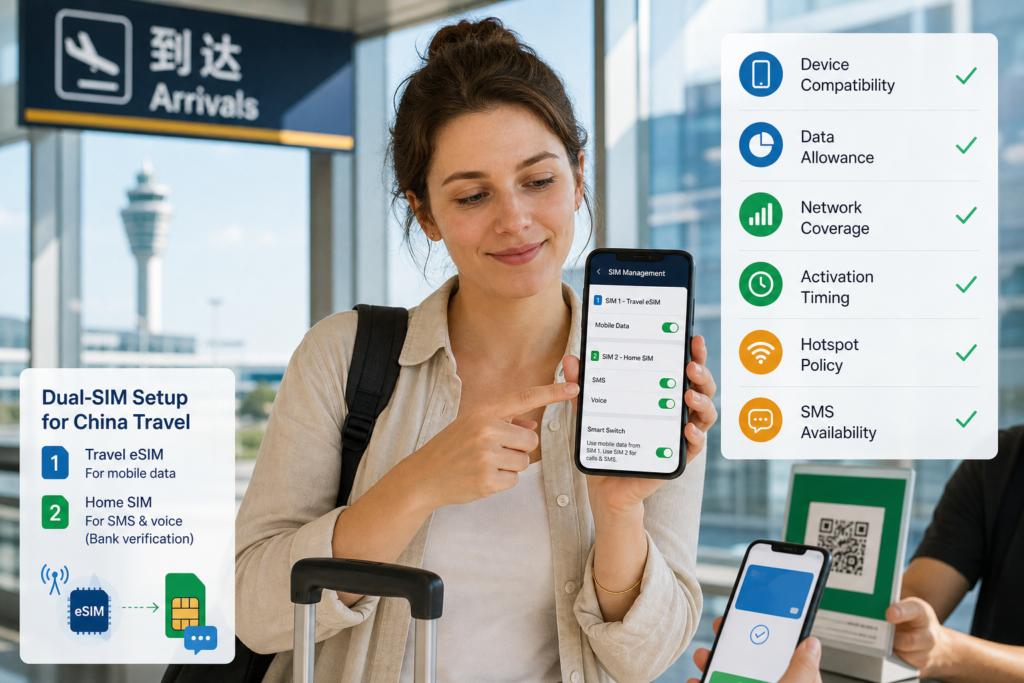
| Device compatibility | Some regional phone models lack eSIM or are carrier-locked | Phone manufacturer and carrier |
| Data-only or phone number | Data-only plans cannot receive normal verification SMS | Provider product page |
| Network and coverage | Availability varies by city, building, congestion, and partner | Provider coverage terms |
| Activation trigger | Installing too early can start some plans | Provider activation policy |
| Data amount and speed policy | “Unlimited” may include fair-use or speed limits | Plan details and terms |
| Hotspot allowance | Tethering may be limited | Provider plan page |
| Refund conditions | Activation can restrict refunds | Provider refund policy |
Data and SMS solve different problems
A wallet needs internet access to load services and communicate during an online payment flow. That connection can come from mobile data or working Wi-Fi; the manuscript’s claim that wallets do not work on Wi-Fi-only devices was false.
SMS is delivered to a phone number, not automatically to whichever SIM supplies data. A data-only travel eSIM usually gives internet access without a callable number. If Alipay, WeChat, or your issuing bank sends a code to your existing home number, that home SIM or another supported delivery method must remain available.
A practical dual-SIM setup
- Keep your home SIM enabled for calls and SMS if your carrier supports roaming reception.
- Install the travel eSIM before departure while you have reliable Wi-Fi, if its activation policy permits.
- Select the travel eSIM for mobile data after arrival.
- Disable data roaming on the home SIM to reduce unintended data charges.
- Keep calls and SMS assigned to the home line when you need its number.
- Ask your home carrier what receiving SMS in China costs and whether bank short codes are supported.
Phone menus differ. Follow Apple, Google, Samsung, or your device maker’s current instructions. Do not enable automatic data switching until you understand which line may incur roaming charges.
Current provider examples—not a ranking
Plans and prices change frequently. The examples below show what to verify on official pages; Extentage did not test or rank them.
Airalo China eSIM
Airalo’s current China page lists the primary network as China Unicom and offers fixed-data and unlimited options. The page identifies the displayed China products as data-only, so do not buy one expecting a Chinese phone number or normal SMS. Activation begins when the eSIM connects to a supported network, according to the current product page. Check the official Airalo China plans immediately before purchase.
Holafly China eSIM
Holafly currently advertises unlimited-data China plans and states that its China eSIM is data-only, with no local number for standard calls or SMS. Its page recommends using the physical SIM for calls and SMS while the eSIM supplies data and warns that the home carrier may still charge roaming fees. Review the official Holafly China page, fair-use terms, hotspot allowance, and refund policy.
Nomad, Ubigi, and other providers may also sell China coverage, but the original manuscript’s price, SMS, and “reliability” claims were not supported by the official sources reviewed. Apply the same checklist to their live terms rather than relying on an old comparison table.
Do you need a Chinese phone number?
China’s official guide says foreigners can register supported payment apps using foreign or Chinese phone numbers and bind eligible overseas cards. A Chinese number is therefore not universally required for visitor wallet use. The issuing bank still must verify the card, and product scope varies. See the government guide for foreigners.
A local SIM can be useful for longer stays, local services, and domestic calls. Official guidance says foreigners can take a passport or Foreign Permanent Resident ID Card to service offices of China Telecom, China Mobile, or China Unicom to apply. Do not assume every airport desk offers the same plan or that a local number guarantees receipt of every wallet or bank code.
Set up payment access before departure
- Install only the official Alipay and WeChat apps.
- Use a phone number you can continue accessing in China.
- Complete truthful passport verification when requested.
- Link an eligible card and confirm issuer authorization.
- Download issuer apps and save official international support numbers.
- Check whether your home SIM can receive SMS while roaming.
- Add a second card or carry reasonable RMB cash as backup.
- Install the eSIM according to its activation policy.
For wallet setup, see how to open and verify Alipay. For choosing a funding card, use the card-selection checklist.
Troubleshooting after arrival
| Symptom | Check first |
|---|---|
| No mobile data | Correct data line, data roaming for travel eSIM, APN, plan activation, remaining allowance |
| No code on home number | Home SIM enabled, roaming registration, signal, blocked short codes, issuer alternative |
| Wallet works on Wi-Fi but not eSIM | App cellular-data permission, correct SIM, provider network status |
| Card payment declined | Issuer, merchant eligibility, wallet status—not just connectivity |
| Payment appears stuck | Transaction history before retrying |
Do not change account identity or location fields merely because an eSIM routes traffic differently. If you suspect the network path, follow Extentage’s controlled wallet network test.
Supplier payments need more than connectivity
Reliable data does not make a personal wallet appropriate for a factory deposit or commercial invoice. Verify the contractual company, beneficiary, invoice, currency, and payment purpose, then choose a business-capable route. Read how to send RMB to Chinese suppliers.
Frequently asked questions
Which eSIM is best for receiving Alipay SMS?
A data-only eSIM cannot receive ordinary SMS. Codes normally go to the number registered with the wallet or issuer. Keep that SIM accessible or choose a plan explicitly including a usable phone number and SMS.
Can Alipay and WeChat Pay work over hotel Wi-Fi?
They can use a functioning internet connection, including Wi-Fi. A captive login page, filtering, weak signal, or separate SMS requirement may still interrupt setup or payment.
Does an eSIM bypass internet restrictions in China?
Routing and accessible services depend on the provider and plan. Check official terms and comply with applicable law; do not infer wallet reliability or lawful access from a marketing claim.
Should I forward bank SMS to another number?
Avoid insecure forwarding. Ask the issuer about approved app authentication, roaming SMS, or another official verification method.
Written by the Extentage editorial team. Reviewed on August 2, 2026. Provider plans, prices, partner networks, fair-use policies, and device support change frequently; verify official terms before purchase.